The seat we didn't have
We lost our first client because we had no seating chart. Now we have one, and buyers can pick their own seats. We're going back to ask for a second chance.
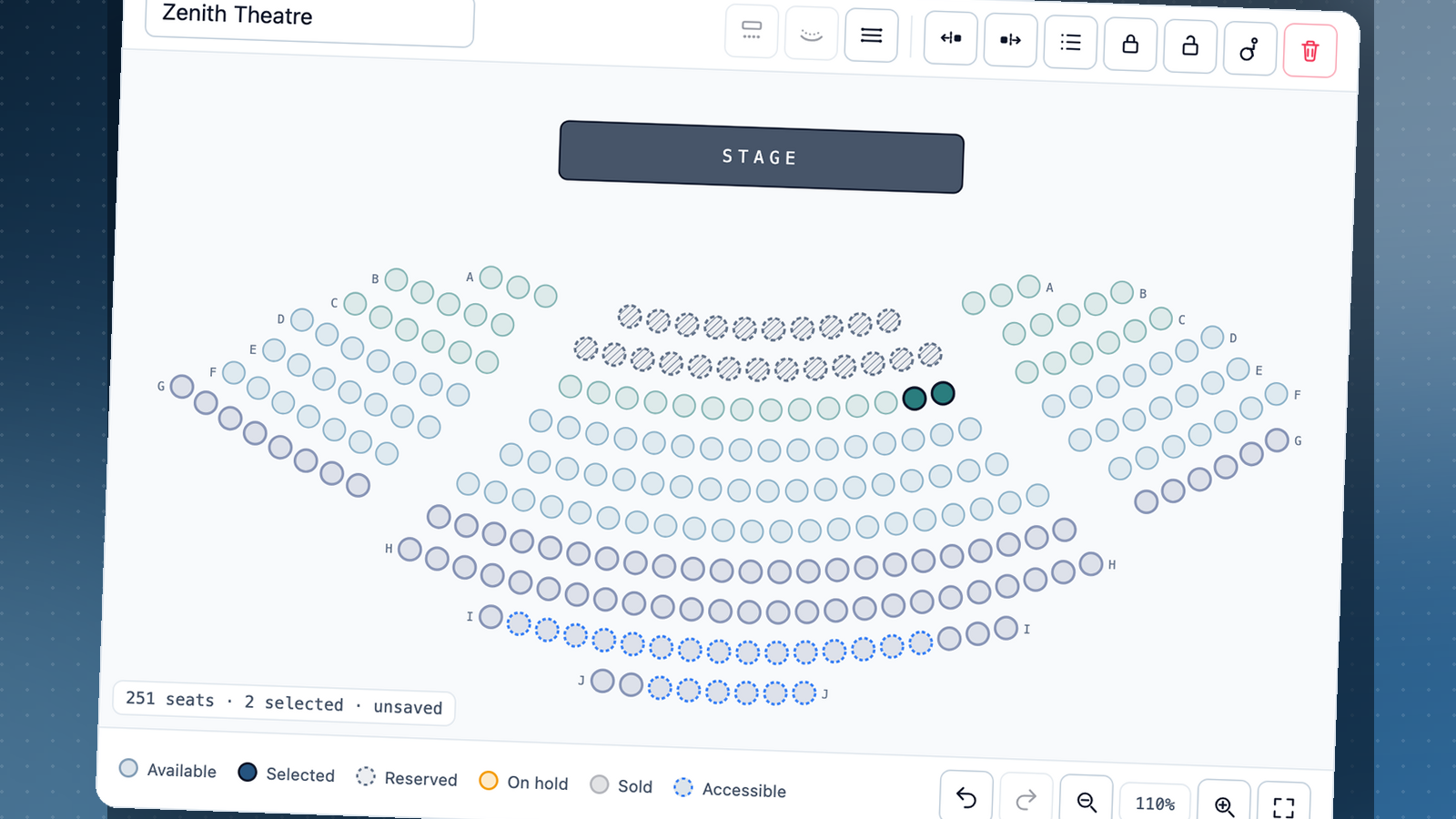
On 20 September we met a client who wanted to move all their events to EasyEntry. They sell assigned seats, with real rows and a proper venue plan. The meeting was going well until they asked, “Can we see the seating chart?”
We didn’t have one. Our system could store seats, but you couldn’t see them or lay out your venue. We said “soon”. They said “we need it now” and went with someone else.
They were right. If a ticketing platform can’t show you your own room, it isn’t ready to sell seats in it. So we built it.
We’re a young company and a small team. We don’t have every feature that older platforms have built up over the years. We’d rather tell you that now than have you find out the way this client did.
What you can do now
If your event has assigned seats, like a theatre show, a gala or a long-table dinner, you can now build a seat map and sell from it.
Start from your venue’s map. When you create an event, pick the venue and one of its seat maps. We have a list of known venues, and you can add your own. If no map fits, build one from scratch. Capacity comes from the map, so you don’t need to enter it.
Choose which tickets go where. Adult, child and concession tickets can all sell in the same section. For each ticket, tick the sections it can be used in. If a section has no ticket, we’ll warn you so you don’t publish seats nobody can buy.
Hold seats back. Mark any seat as reserved, such as house seats, the tech desk or a restricted view. It stays on the map, but nobody can buy it.
Keep making changes after tickets go on sale. You can still reserve or release unsold seats, and change the tickets on a section that hasn’t sold anything yet. The layout itself is locked once the event is published. If a change would affect a sold seat, we’ll tell you which one instead of cancelling someone’s ticket. Use “Preview as buyer” to see exactly what your buyers see.
Let buyers pick their seats. On the event page, buyers choose seats on the map from their phone or computer. If a section sells more than one kind of ticket, they say how many of each they want. The seat is shown on their ticket, their email and their PDF.
This is free, like everything else. We don’t have paid plans, so if your event has seats, you get the seat map.
Why we didn’t rush it
We hadn’t realised how many events sell the seat itself, where “row F, seat 12” is part of what someone is paying for. Losing that client made that clear, and we didn’t want to ship something half-finished.
So we got the details right. You can’t delete a sold seat by accident. You can reuse a venue map for years, and later edits won’t change a show that’s already on sale. Seats you hold back stay held back. Nobody notices these things when they work, but everyone notices when they don’t.
What’s next
We’re going back to that client this week. We won’t pretend the first meeting didn’t happen. We weren’t ready, and they were right to say so. But we’d still like the chance to run their events.
Our promise to everyone who uses EasyEntry: we’ll be honest about what we don’t have yet. When we find a gap, we’ll fix it properly, not just enough to win the next deal. There will be more gaps, and when we fix one, every organiser gets the fix.
If seating is what’s been stopping you, tell us about your venue.
Keep reading

One picture was never enough for your event
Your event page can now hold three images. Keep your banner up front, then add the poster, the seating plan or last year's crowd.
Hello, world
Somewhere tonight, someone is running an event off a spreadsheet, a cash tin and a mate on the door with a printed list. We built EasyEntry for that night.
Running an event?
Create your event, publish it, and start selling in minutes. No plans, no setup fee, and free events are always free.
Create your event →